Pathways app design
MARCH 2022 - MAY 2022
1
User Research
Intro To User Research
User research is an important part of designing any app as it allows researchers to understand what the user will need from it. Instead of researchers creating the app based on what we believe the user will need, we can use the gathered data to create an app best suited for the user.
User research is an important part of designing any app as it allows researchers to understand what the user will need from it. Instead of researchers creating the app based on what we believe the user will need, we can use the gathered data to create an app best suited for the user.
In order to gather this information, we must first solidify our problem description, what is it are we trying to solve? After solidifying this, we gather our potential users and acquire their thoughts on the matter. This section will go in detail about our problem description and how we set up and conducted our focus group to gather data.
Problem Description
The original problem was derived from the Hatchways startup company, as presented in the Y Combinator’s S19 Demo Day 1 from 2019. When applying for a job, securing an interview is an important step, but it is also a step that many applicants have minimal control over once their application is sent to the recruiters. An applicant's resume, specifically their experiences are what draws a recruiter's interest (or triggers an auto-filter) which may eventually lead to an invitation for an interview.
The original problem was derived from the Hatchways startup company, as presented in the Y Combinator’s S19 Demo Day 1 from 2019. When applying for a job, securing an interview is an important step, but it is also a step that many applicants have minimal control over once their application is sent to the recruiters. An applicant's resume, specifically their experiences are what draws a recruiter's interest (or triggers an auto-filter) which may eventually lead to an invitation for an interview.
It is hard for entry-level programmers to land an interview in a big tech company without any previous internship experience or team projects. Unfortunately, the problem may continue even if an applicant does secure an interview. A newly graduated entry-level programmer may be well versed in many different disciplines, but interviews sadly tend to focus on theory or specific Leetcode questions. Unless the applicant thoroughly studied this material prior to the interview, they are not able to show their full potential as a future employee.
Focus Setting
The issues associated with securing and performing well in an interview demonstrate a clear gap between education and employment that lead to many people getting overlooked in the hiring process. We decided to take on the task of solving this issue and concluded that the best way to do this was to create a platform to help new software engineers get the practice that will lead to them landing full-time offers at different tech companies.
The issues associated with securing and performing well in an interview demonstrate a clear gap between education and employment that lead to many people getting overlooked in the hiring process. We decided to take on the task of solving this issue and concluded that the best way to do this was to create a platform to help new software engineers get the practice that will lead to them landing full-time offers at different tech companies.
When trying to determine what to include in this platform in order to effectively solve the issue, we decided to first consider our own journeys to employment. We discovered that while our journeys were different, there were still some main similarities regarding what we wanted or what we wished we had. It was decided to research the following focus setting: to explore different journeys and to learn about others' paths to employment. We conducted a focus group to gather data on this.
Focus Group
To learn more about the different journeys to employment, we decided to conduct a focus group consisting of 6 users. 3 users were still in the process of looking for a job, and the other 3 already had a job lined up or were currently employed. We decided to focus on these types of users because they all have insight into our primary users: users who are actively pursuing a job and are struggling. The first type of users in the focus group are the primary users.
To learn more about the different journeys to employment, we decided to conduct a focus group consisting of 6 users. 3 users were still in the process of looking for a job, and the other 3 already had a job lined up or were currently employed. We decided to focus on these types of users because they all have insight into our primary users: users who are actively pursuing a job and are struggling. The first type of users in the focus group are the primary users.
They were included to help us deduce exactly the current struggles users face when trying to secure a job.The second type of users in the focus group was included so we could learn what techniques and practices helped them to secure their current/future employment. While talking to the group, we learned that the most important part of the job hiring process was performing well in the interview, but this is also the part that consisted of multiple barriers for both types of users for multiple reasons. Most of these reasons stemmed from nervousness and lack of preparation or knowledge.
2
Design Process
Intro to Design Process
After conducting the focus group, it was time to sort through the data to identify the user needs we will address. To do this, we created an Affinity Diagram in order to have all our notes in one place to group them together into categories.
After conducting the focus group, it was time to sort through the data to identify the user needs we will address. To do this, we created an Affinity Diagram in order to have all our notes in one place to group them together into categories.
Once the diagram was created, and we finished walking through the data, we then created different user personas in order to get a better understanding of the target audience of our app. Using the personas, we then created scenarios and storyboards in order to better visualize specific ways users may interact with our app. The following section will explain these different steps in more detail.
Affinity Diagrams
Once the focus group was completed, all the data was collected and placed in Miro and separated across different post-it notes. These post-it notes were then used to categorize the data into common themes. Common themes that emerged from the data were that users felt that they had little to no help from friends, had a tendency to work prior to the main position, created their resumes before graduation and felt that it was their main issue before applying, were very anxious about interviews, and thought that being involved was key to success. Based on these themes and walking the data we identified 5 key user needs that need to be addressed:
Once the focus group was completed, all the data was collected and placed in Miro and separated across different post-it notes. These post-it notes were then used to categorize the data into common themes. Common themes that emerged from the data were that users felt that they had little to no help from friends, had a tendency to work prior to the main position, created their resumes before graduation and felt that it was their main issue before applying, were very anxious about interviews, and thought that being involved was key to success. Based on these themes and walking the data we identified 5 key user needs that need to be addressed:
Prepare for technical interview questions by practicing
More feasible and worth showing projects in the portfolio
Finding a community of other people who are in the same situation as you in terms of looking for work, sharing each other's process and errors in order to maintain continual motivation in applying for more job openings
Remove the nervousness that arises during and before the interview
Resume preparation as soon as possible, not right before the job application or graduation, so that the person has time to prepare it and make it as much appropriate as possible by adding necessary information/keywords
It seemed that the main user goal that was in the data was for the user to feel more confident about their ability to acquire a job after graduation, or after their education. A breakdown of the current problems they face preventing them achieve this goal are the following:

- Because they didn't know what to anticipate, users in the focus group were nervous before the interview. This may be utilized as an instructive component of our program, implemented through the usage of a blog section or group chats for our users. Another component that can accompany this program is a section that has all the company information for the user before an interview. Such information may include the following info: the company’s methodologies of software development, how the company keeps communication with its employees, what is the ideology of the company, and other helpful details.
2. Users were unsure about their resumes and the reasons for not being approved. This might be due to a lack of keywords in their CV for a certain job opening. This may be utilized as an automated resume check section, indicating which terms on their resume are regarded as 'key.' Users will be able to rectify themselves if they are aware of how the algorithm perceives their CV as well as being able to improve and correct it in a way that will most probably suit the job opening.
Some missed questions that should have been asked upon reflection on the data were about whether or not they went into their first interview with confidence in their resume but started to lose this confidence as the interview went on. Had we had this information, we would have been able to have a better understanding of what users felt about their resumes as they went through their entire journey, not just at the beginning or at the end. After walking through the data, the following design opportunities were identified:
- Have a profile creation option and make it similar to social media so that people can discover each other with the same aim and share their experiences in group chats or blogs.
- We may offer a free ATS passing test so that users can see what keywords are being taken from their resume by the algorithm and alter it themselves to meet the desired role.
- Create group hackathons to bring together diverse sorts of developers (front-end, back-end, designers, etc.) so that they may collaborate on projects and add them to their resumes as experience.
- Add blogs where individuals may share their insider knowledge on how to 'crack' the interview.
- Add everyday technical problems that they can solve and set a goal of the number of those problems solved for each week.
- Add a post-account creation survey that serves the purpose of finding the user’s most important weakness and display them a list of helpful articles on that matter.
- Create a notification system that collects the most relevant and helpful articles as well as finds the most similar people and sends users the list of those articles and people they might be interested in connecting with.
Some other themes that were noticed throughout the focus group were how comfortable people were with sharing their stories about their experiences obtaining jobs and internships. Usually, this can be a very touchy subject for people, but the participants' willingness to share their experiences after learning many of them had similar ones brought a sense of community within the group.
User Personas
Using the discovered user needs we created three different personas. Our primary personas are John and Kyla. John is a junior in college who is looking for an internship over the summer but doesn’t have any prior experience or big projects in his portfolio. Kyla is a senior in college who is about to graduate and is looking for an entry-level position for post-graduation. She has minimal experience thanks to her schoolwork and past interviews but feels she has no practical experience. Together, John and Kyla embody most of the key user needs that we discovered through our research for our main users: practicing for technical interviews, finding a community for support and advice, and resume development tips.
Using the discovered user needs we created three different personas. Our primary personas are John and Kyla. John is a junior in college who is looking for an internship over the summer but doesn’t have any prior experience or big projects in his portfolio. Kyla is a senior in college who is about to graduate and is looking for an entry-level position for post-graduation. She has minimal experience thanks to her schoolwork and past interviews but feels she has no practical experience. Together, John and Kyla embody most of the key user needs that we discovered through our research for our main users: practicing for technical interviews, finding a community for support and advice, and resume development tips.
“There’s so much to learn and do”
Key Details:
John is a junior in college who is looking for an internship position to get some real-world experience. He has no interview experience, no projects to show on his portfolio, and has little involvement in his field of study in the community. He doesn’t feel prepared for the future interview as he didn’t read or watch any preparational videos regarding the interview process. He is interested in getting as much experience in the interview process as possible because the other aspects are not helpful for him at such a stage of his career.
- Junior in College
- Male
- Computer Science Student
Key Details:
- Searching for a summer internship
- Has no prior experience and big projects
- Prepare for technical interview questions by practicing
- Finding a community of other people who are in the same situation to learn more about the process and get motivation
- To find a summer internship to add to his resume
- To overcome his nervousness about attaining an internship
- Gain more interview experience
John is a junior in college who is looking for an internship position to get some real-world experience. He has no interview experience, no projects to show on his portfolio, and has little involvement in his field of study in the community. He doesn’t feel prepared for the future interview as he didn’t read or watch any preparational videos regarding the interview process. He is interested in getting as much experience in the interview process as possible because the other aspects are not helpful for him at such a stage of his career.
“I need more experience”
Key Details:
Kyla is an upcoming graduate who is looking for some entry or middle level position to apply to. She has some experience with her school/outside projects as well as a bit of an interview experience as she had some helpful activities during her education. Her CV has been updated a couple of times and she feels a bit confident about her portfolio. She has some connections in her field and did some group projects. However, her field of interest requires more practical experience to get the highest possible position after the upcoming interview. Kyla would also like some advice for a better interview outcome.
- Senior in College
- Graduating soon
- Female
- Computer Science Student
Key Details:
- Searching for a entry level position post graduation
- Has minimal experience through school and interviews but no practical experience
- Connecting and working with others to gain advice about how to increase practical experience
- Resume and interview preparation to properly display her experiences and achievements
- Acquire an entry level position so she will have a job post graduation
- Learn more about her field of interest
Kyla is an upcoming graduate who is looking for some entry or middle level position to apply to. She has some experience with her school/outside projects as well as a bit of an interview experience as she had some helpful activities during her education. Her CV has been updated a couple of times and she feels a bit confident about her portfolio. She has some connections in her field and did some group projects. However, her field of interest requires more practical experience to get the highest possible position after the upcoming interview. Kyla would also like some advice for a better interview outcome.
“It’s always good to be a guide”
Key User Needs:
Poppy has 2-3 years of job experience and has already done numerous small/middle scale projects. He has a broad number of colleagues and friends who are in the same field and has experience in doing collaborative work as well as overall communication in the work environment. He has gone through a lot of interviews, thus he knows what to do and how to behave so he’s completely comfortable with the interview process. He is interested in imparting his knowledge and experience to others because he understands just how hard finding a job can be.
- Employed
- Male
Key User Needs:
- Connect with others to impart knowledge and advice from his experiences
- Help others to succeed in their job hunting
- Already employed
- Has a lot of knowledge to share with others
Poppy has 2-3 years of job experience and has already done numerous small/middle scale projects. He has a broad number of colleagues and friends who are in the same field and has experience in doing collaborative work as well as overall communication in the work environment. He has gone through a lot of interviews, thus he knows what to do and how to behave so he’s completely comfortable with the interview process. He is interested in imparting his knowledge and experience to others because he understands just how hard finding a job can be.
During our focus group, it felt like the people who had already gotten jobs or who were employed had advice to offer as they explained their journeys to this point. Those without jobs also wished they had someone on the inside to give them advice and guidance. That is why we came up with our secondary user group: people who are employed. This group is represented by our persona Poppy, a software developer. He is already employed and has knowledge that he wants to share with others. His specific user need is to be able to connect with other users, specifically our main user group, to be able to impart knowledge from his experiences.
Scenarios and Storyboards
After creating our personas, the next step was to create different scenarios featuring these personas to get a better understanding of how our users will be interacting with the app. These scenarios were then illustrated through storyboards. This way we can visually see the potential interactions our user will have with the app as they prepare themselves to either apply to different job opportunities or help others with this task. Here are the scenarios and storyboards for each persona.
After creating our personas, the next step was to create different scenarios featuring these personas to get a better understanding of how our users will be interacting with the app. These scenarios were then illustrated through storyboards. This way we can visually see the potential interactions our user will have with the app as they prepare themselves to either apply to different job opportunities or help others with this task. Here are the scenarios and storyboards for each persona.
John’s Scenario and Storyboard:
John is trying to find a summer internship so he can gain more experience to add to his resume, but the amount of things he needs to learn and prepare is overwhelming. This makes John nervous, but thanks to “Pathways” he now has a guide for what to do. The first thing John needs to do in order to start his job search is to learn about the different interview questions that might come up. Since John is a Computer Science student, he will be facing both technical and behavioral questions during the interview. With “Pathways”, John now has access to sample questions to help prepare him for the different interview questions so he won’t get stuck with his answers. Next, John needs to learn more about the jobs out there and the industry, so he can determine what is the best fit for him. “Pathways” will also allow John to connect with others that are using the app as well. He can either connect with people who have more experience than him and gain advice about different jobs in the industry and the job hunting process, or he can connect with others who are also in his position so he doesn’t feel like he is alone in this. With all this support and encouragement, John starts to feel more confident in his prospects to acquire a summer internship so he can continue to learn and grow for his future career.
John is trying to find a summer internship so he can gain more experience to add to his resume, but the amount of things he needs to learn and prepare is overwhelming. This makes John nervous, but thanks to “Pathways” he now has a guide for what to do. The first thing John needs to do in order to start his job search is to learn about the different interview questions that might come up. Since John is a Computer Science student, he will be facing both technical and behavioral questions during the interview. With “Pathways”, John now has access to sample questions to help prepare him for the different interview questions so he won’t get stuck with his answers. Next, John needs to learn more about the jobs out there and the industry, so he can determine what is the best fit for him. “Pathways” will also allow John to connect with others that are using the app as well. He can either connect with people who have more experience than him and gain advice about different jobs in the industry and the job hunting process, or he can connect with others who are also in his position so he doesn’t feel like he is alone in this. With all this support and encouragement, John starts to feel more confident in his prospects to acquire a summer internship so he can continue to learn and grow for his future career.

Kyla’s Scenario and Storyboard:
Kyla is about to graduate from her senior year, and she is currently looking for a job post-graduation. While looking through different positions, Kyla realizes that she doesn’t have too much experience to succeed, but thanks to the different opportunities “Pathways” offer, she doesn’t need to worry anymore. Kyla’s first concern was that all of her experience thus far has only been related to school - she didn’t have any personal projects that she could put on her resume. But thanks to the different hackathons that were hosted on “Pathways” she was able to gain practical experience, both in her field of interest as well as in team collaboration, so she could improve her resume. Kyla was also a little nervous about how to handle interview questions regarding her field of interest. While she was interested in the field, she didn’t know too much about the industry and what should be expected to know. Luckily, she was able to read all about the industry and interview tips from different blogs by different “Pathways” users who work and have real experiences in the industry. Thanks to “Pathways”, Kyla was able to improve her resume and her interview skills so she was able to present the best version of herself to her favorite employer, and now has the opportunity to work for them.
Kyla is about to graduate from her senior year, and she is currently looking for a job post-graduation. While looking through different positions, Kyla realizes that she doesn’t have too much experience to succeed, but thanks to the different opportunities “Pathways” offer, she doesn’t need to worry anymore. Kyla’s first concern was that all of her experience thus far has only been related to school - she didn’t have any personal projects that she could put on her resume. But thanks to the different hackathons that were hosted on “Pathways” she was able to gain practical experience, both in her field of interest as well as in team collaboration, so she could improve her resume. Kyla was also a little nervous about how to handle interview questions regarding her field of interest. While she was interested in the field, she didn’t know too much about the industry and what should be expected to know. Luckily, she was able to read all about the industry and interview tips from different blogs by different “Pathways” users who work and have real experiences in the industry. Thanks to “Pathways”, Kyla was able to improve her resume and her interview skills so she was able to present the best version of herself to her favorite employer, and now has the opportunity to work for them.

Poppy’s Scenario and Storyboard:
Poppy is a software developer who has been in his position for the last 2-3 years. He knows a couple of upcoming college graduates and juniors who are trying to secure jobs or internships. He has been hearing that many of them are struggling due to a lack of connections and experience. Poppy has sympathy for them as he was once in their shoes and wants to help them in any way he can. With the help of “Pathways”, Poppy is able to do just that. As he learned throughout his career, collaboration skills are key to success in the industry. To help others experience this, Poppy sets up different hackathons on the “Pathways” app to allow others to participate and work with each other. Not only is Poppy allowing them to gain collaborative skills through this, but students can add these hackathons to their experience. Next, Poppy is interested in giving advice directly to the students, especially those who are looking to get into software development. He knows that having connections is key for the business, and he wants to be one for others. With “Pathways” Poppy is able to connect directly to students, and he can chat with them to learn more about them so he can properly mentor them. Lastly, Poppy understands that choosing a job can be overwhelming for many reasons, so he decides to create a blog on the app so others can read it and learn from his experiences. He hopes that this can ease the students' tension. Even though no one is forcing Poppy to do all of this, he is more than happy to be the support for others that he wished he had in the past, and he is even happier that “Pathways” can support him with this!
Poppy is a software developer who has been in his position for the last 2-3 years. He knows a couple of upcoming college graduates and juniors who are trying to secure jobs or internships. He has been hearing that many of them are struggling due to a lack of connections and experience. Poppy has sympathy for them as he was once in their shoes and wants to help them in any way he can. With the help of “Pathways”, Poppy is able to do just that. As he learned throughout his career, collaboration skills are key to success in the industry. To help others experience this, Poppy sets up different hackathons on the “Pathways” app to allow others to participate and work with each other. Not only is Poppy allowing them to gain collaborative skills through this, but students can add these hackathons to their experience. Next, Poppy is interested in giving advice directly to the students, especially those who are looking to get into software development. He knows that having connections is key for the business, and he wants to be one for others. With “Pathways” Poppy is able to connect directly to students, and he can chat with them to learn more about them so he can properly mentor them. Lastly, Poppy understands that choosing a job can be overwhelming for many reasons, so he decides to create a blog on the app so others can read it and learn from his experiences. He hopes that this can ease the students' tension. Even though no one is forcing Poppy to do all of this, he is more than happy to be the support for others that he wished he had in the past, and he is even happier that “Pathways” can support him with this!

3
Design Solution
Intro to Design Solution
The next step after walking the data is creating a prototype of our solution. This includes creating a task flow diagram, an initial set of wireframes from this task flow diagram and then performing basic user testing to continue to improve and iterate through the designs. This section will discuss the initial set of wireframes, and how we iterated to our second set after the mid-point class critique.
The next step after walking the data is creating a prototype of our solution. This includes creating a task flow diagram, an initial set of wireframes from this task flow diagram and then performing basic user testing to continue to improve and iterate through the designs. This section will discuss the initial set of wireframes, and how we iterated to our second set after the mid-point class critique.

We first created a paper prototype by creating wireframes on Figma and printing them out. This wireframe was based on the taskflow chart we created indicating the different steps the users should take in order to complete different tasks.
Click here to see the Wireframe
Click here to see the Wireframe

The taskflow chart is too large to include in this document, so a link to it can be found here.
The first version of the prototype saw the inclusion of a home screen which led to 3 to 4 different screens - a Hackathon Screen, Blog Screen, a Chat Screen, and an Interview Practice screen (if the logged-in user was someone looking for employment).
Once the paper prototype was complete, we recruited some CS students we know who are in the same demographic as our users to test it out using the Think Aloud method. We had them perform different tasks and explain their thought process. During this test we had found that we were missing a couple of screens, as when the tester tried clicking a button, we did not have a new screen to provide to them. We then included these screens indicating that they were a work in progress for these specific buttons for our high-fidelity prototype that was presented during the mid-point critique.
Second Iteration of Wireframes
During the mid-point critique, the main pieces of feedback we received were the following:
In order to address the first two pieces of feedback, we decided to implement extra screens. Specifically for the first feedback, we included a screen for the profile page of the user. Here, the user will have the option to edit their profile once they successfully obtain a job (if they choose to now help others). Right now since we don’t suspect our users needing to edit their profiles so soon, we have those screens as a work in progress. To address the second piece of feedback we got from the class, we took a look at the buttons that class members clicked while exploring the prototype that wasn’t already implemented. These buttons were meant to lead to either registration screens for hackathons, or blog posts. We created these extra screens and linked them to the buttons in the prototype. A link to view the final interactive prototype can be found here, and a link to view the annotated version of the prototype, indicating what changed, can be found here.
During the mid-point critique, the main pieces of feedback we received were the following:
- Including a way to update whether the user is still unemployed or not. This was not thought of during the initial design.
- Implementing more screens. Some buttons led to features that weren’t implemented yet, and users wanted to see how those would look.
- Many users commented on how the app was intuitive to use thanks to the size of the text, labeling of buttons, and use of color.
In order to address the first two pieces of feedback, we decided to implement extra screens. Specifically for the first feedback, we included a screen for the profile page of the user. Here, the user will have the option to edit their profile once they successfully obtain a job (if they choose to now help others). Right now since we don’t suspect our users needing to edit their profiles so soon, we have those screens as a work in progress. To address the second piece of feedback we got from the class, we took a look at the buttons that class members clicked while exploring the prototype that wasn’t already implemented. These buttons were meant to lead to either registration screens for hackathons, or blog posts. We created these extra screens and linked them to the buttons in the prototype. A link to view the final interactive prototype can be found here, and a link to view the annotated version of the prototype, indicating what changed, can be found here.
4
User Testing
Intro to User Testing
User testing is the next step in our design process. This is important as we can uncover any potential errors that may still be present in the prototype. The method of testing we used was the Think-Aloud Protocol. In this method, we had our testers complete a series of tasks that we set up for them, and asked them to think aloud as they went through the prototype. While they were talking and completing the tasks, we took notes and listened to what they had to say. The following section explains in detail how we conducted and evaluated our Think Aloud Testing.
User testing is the next step in our design process. This is important as we can uncover any potential errors that may still be present in the prototype. The method of testing we used was the Think-Aloud Protocol. In this method, we had our testers complete a series of tasks that we set up for them, and asked them to think aloud as they went through the prototype. While they were talking and completing the tasks, we took notes and listened to what they had to say. The following section explains in detail how we conducted and evaluated our Think Aloud Testing.
Think Aloud Testing
We had our users complete three tasks: Log in as someone looking to be employed, Do some activities to prepare for an interview, and Send a message to someone. The second task contained 3 subtasks: Practice an interview question, Read a blog, and Join a Hackathon. The following is how each task was deemed completed:
We had our users complete three tasks: Log in as someone looking to be employed, Do some activities to prepare for an interview, and Send a message to someone. The second task contained 3 subtasks: Practice an interview question, Read a blog, and Join a Hackathon. The following is how each task was deemed completed:
Log in as someone looking to be employed
✅ Task deemed successfully completed: When the user successfully gets to the home screen. If they couldn’t, it was considered a failed attempt.
Do some activities to prepare for an interview
Practice an interview question
✅ Task deemed successfully completed: When the user reaches the “Finished
Interview Set” page. If they couldn’t, it was considered a failed attempt.
Read a blog
✅ Task deemed successfully completed: When the user reaches one of the blogs to read. If they couldn’t, it was considered a failed attempt.
Join a Hackathon
✅ Task deemed successfully completed: When the user reaches the registration
page of a hackathon. If they couldn’t, it was considered a failed attempt.
✅ Task deemed successfully completed: When the user reaches the “Finished
Interview Set” page. If they couldn’t, it was considered a failed attempt.
Read a blog
✅ Task deemed successfully completed: When the user reaches one of the blogs to read. If they couldn’t, it was considered a failed attempt.
Join a Hackathon
✅ Task deemed successfully completed: When the user reaches the registration
page of a hackathon. If they couldn’t, it was considered a failed attempt.
Send a message to someone
✅ Task deemed successfully completed: When the user reaches the conversation page with someone they are connected with. If they couldn’t, it was considered a failed attempt.
We tested the prototype with 2 users. While both users completed the tasks, we asked them to talk out loud. As they were talking, we took notes about what they thought each part of the screen was and any part where they showed signs of difficulty, if any. Some basic statistics of the user testing include: out of the 5 total tasks both users were able to successfully complete all 5. One user completed all 5 with no issues, but the other slightly struggled with the “Join a Hackathon” task. They did not quickly realize one of the buttons was indeed a button, instead, they believed it was an ad. But, they eventually discovered it on their own without input from the designer so it was still deemed a success. A more thorough examination of the data is included in the Appendix. Overall, these results indicate that our prototype is intuitive to use for the most part. After the testing was over, we had a discussion with each of the users about their experience with the prototype. Their feedback, as well as some notes for improvement that were taken during the testing, is as follows:
- The user is not able to customize the profile. Including the option would help the user feel more personal with the app.
- Some pages did not allow for an easy way to go to a previous screen. While it isn’t too much of a hindrance, it would become frustrating to start a task over.
- There were no distinguishable differences between the text on the screens. This made everything a little too uniform. Changing this would help items stand out more.
- The ordering of some of the content did not make sense. For example, it’s faster to access the blogs before the authors.
- The “News” title was misleading. The user thought there would be news articles, but instead, it was a summary of the other tabs. Changing this in future iterations would help lessen confusion.
5
UI Implementation
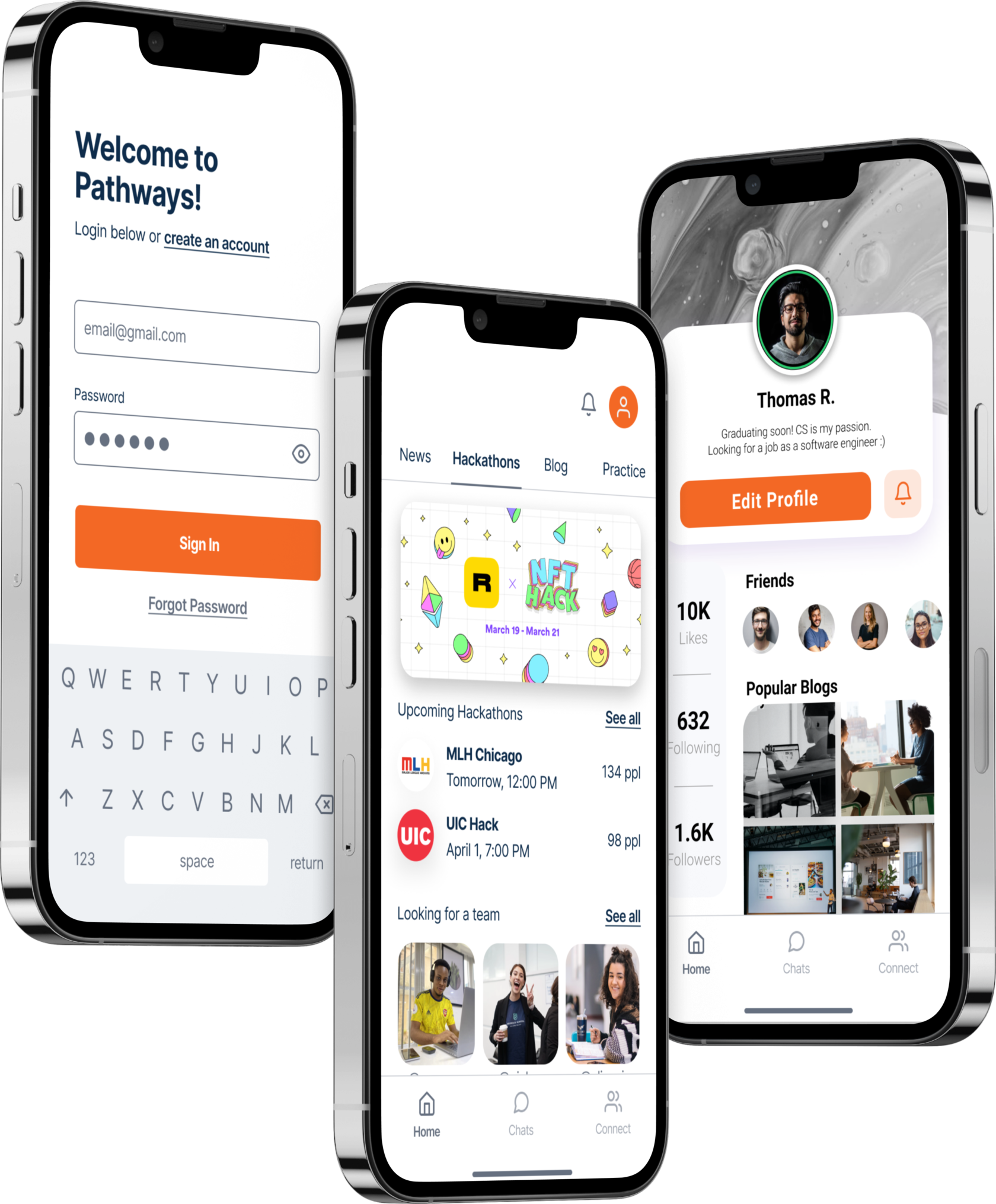
Our UI implementation part is fully done by using the React Native framework. We have developed all screens as well as distinct components in order to easily construct each screen as we progressed through the development process. For testing an application we used expo. Expo is a special environment-lib that allows you to use both React lib and native features of the phone. For the routing inside, we used React Native Navigation which brings lots of useful and ready-to-use tools for manipulating the screens.
While developing the actual mobile working app, we have faced some of the challenges with those screens that show the user the view of the single elements. One of those challenges is the single blog view that was used as a substitution to one of the screens that had a single blog listing on the home tab. Another challenge was some parts of actual logic of navigation where they didn’t make sense on the prototype. The overall usability of the app was actually improved in a sense of being more intuitive than it used to be in the prototype before.
